


昨天打完LOL后 跟队友进行了一番国粹聊天,可能对方没尽兴,还加我好友要继续和我沟通
可能是个人魅力吧,想要找我再续前缘
但是我哪那么多时间跟他干劈情操
于是 顺手ai生成了一键喊话
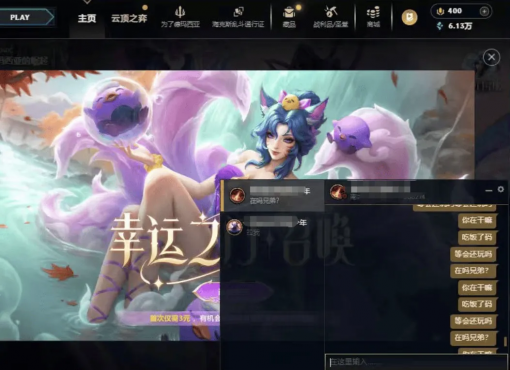
然后放在那 我吃饭去了,截图就不放了,审核过不去,放一个拿我朋友测试的吧
在这个代码同级目录新建个messages.txt]文件 里面一行一行写好你要发送的话就行了
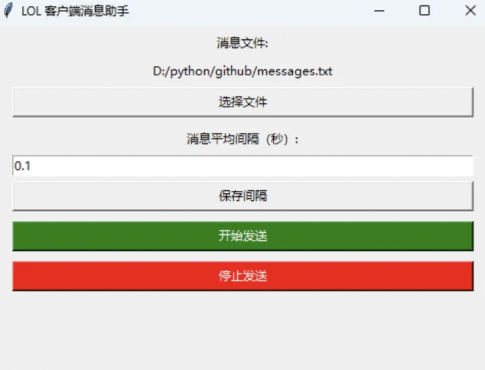
Python代码:
import pyautogui, pyperclip, pygetwindow as gw, time, random, json, threading, tkinter as tk
from tkinter import filedialog, messagebox
CONFIG_FILE = "config.json"
config = {"txt_file":"messages.txt","avg_delay":0.1}
RUNNING = False
messages = []
def save_config():
with open(CONFIG_FILE,"w",encoding="utf-8") as f: json.dump(config,f,indent=4)
def load_config():
global config
try:
with open(CONFIG_FILE,"r",encoding="utf-8") as f: config=json.load(f)
except: save_config()
def load_messages():
global messages
try:
with open(config["txt_file"],"r",encoding="utf-8") as f:
messages=[line.strip() for line in f if line.strip()]
if not messages: messagebox.showwarning("警告","消息文件为空!")
except Exception as e: messagebox.showerror("错误",f"读取文件失败: {e}")
def focus_lol_client():
windows = gw.getWindowsWithTitle("League of Legends")
if windows: windows[0].activate(); time.sleep(0.15); return True
else: print("没找到LOL客户端窗口"); return False
def smart_delay():
avg=config.get("avg_delay",0.1)
while True:
t=random.expovariate(1/avg)
if t<=1.3: return t
def send_message(msg):
pyperclip.copy(msg)
time.sleep(0.01)
pyautogui.hotkey('ctrl','v')
time.sleep(0.01)
pyautogui.press('enter')
time.sleep(0.02)
def start_loop_thread():
global RUNNING
RUNNING=True
if not messages: load_messages()
if not messages: return
i=0
while RUNNING:
if focus_lol_client():
send_message(messages[i])
print("发送:",messages[i])
i=(i+1)%len(messages)
time.sleep(smart_delay())
print("已停止发送")
def start_loop(): threading.Thread(target=start_loop_thread,daemon=True).start()
def stop_loop(): global RUNNING; RUNNING=False
def choose_file():
file_path=filedialog.askopenfilename(filetypes=[("Text files","*.txt")])
if file_path: config["txt_file"]=file_path; save_config(); load_messages(); file_label.config(text=file_path)
def update_delay(): config["avg_delay"]=delay_var.get(); save_config()
===== GUI =====
load_config()
load_messages()
root=tk.Tk()
root.title("LOL 客户端消息助手")
root.geometry("500x400") # 窗口高度加大,保证按钮可见
tk.Label(root,text="消息文件:").pack(pady=5)
file_label=tk.Label(root,text=config["txt_file"])
file_label.pack(fill='x', padx=20)
tk.Button(root,text="选择文件",command=choose_file).pack(fill='x', padx=20, pady=5)
tk.Label(root,text="消息平均间隔(秒):").pack(pady=5)
delay_var=tk.DoubleVar(value=config.get("avg_delay",0.1))
tk.Entry(root,textvariable=delay_var).pack(fill='x', padx=20)
tk.Button(root,text="保存间隔",command=update_delay).pack(fill='x', padx=20, pady=5)
start_button=tk.Button(root,text="开始发送",command=start_loop,bg="green",fg="white")
start_button.pack(fill='x', padx=20, pady=5)
stop_button=tk.Button(root,text="停止发送",command=stop_loop,bg="red",fg="white")
stop_button.pack(fill='x', padx=20, pady=5)
root.mainloop()