

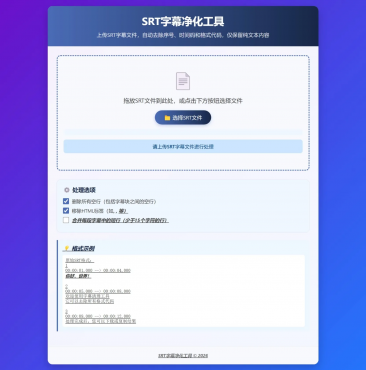
对于srt字幕文件,可以去除其中的行号、时间、格式、空行,仅保留字幕文本。
代码:
<!DOCTYPE html>
<html lang="zh-CN">
<head>
<meta charset="UTF-8">
<meta name="viewport" content="width=device-width, initial-scale=1.0">
<title>SRT字幕净化工具</title>
<style>
* {
box-sizing: border-box;
margin: 0;
padding: 0;
font-family: 'Segoe UI', Tahoma, Geneva, Verdana, sans-serif;
}
body {
background: linear-gradient(135deg, #6a11cb 0%, #2575fc 100%);
color: #333;
min-height: 100vh;
padding: 20px;
display: flex;
justify-content: center;
align-items: center;
}
.container {
width: 100%;
max-width: 900px;
background-color: rgba(255, 255, 255, 0.95);
border-radius: 16px;
box-shadow: 0 10px 30px rgba(0, 0, 0, 0.2);
overflow: hidden;
}
header {
background: linear-gradient(90deg, #4b6cb7, #182848);
color: white;
padding: 25px 30px;
text-align: center;
position: relative;
}
h1 {
font-size: 2.2rem;
margin-bottom: 10px;
}
.subtitle {
font-size: 1.1rem;
opacity: 0.9;
max-width: 600px;
margin: 0 auto;
line-height: 1.5;
}
.main-content {
padding: 30px;
}
.upload-area {
border: 3px dashed #4b6cb7;
border-radius: 12px;
padding: 40px 20px;
text-align: center;
background-color: #f8f9ff;
transition: all 0.3s ease;
margin-bottom: 30px;
position: relative;
}
.upload-area:hover, .upload-area.dragover {
background-color: #eef2ff;
border-color: #182848;
}
.upload-icon {
font-size: 60px;
color: #4b6cb7;
margin-bottom: 15px;
}
.upload-text {
font-size: 1.2rem;
margin-bottom: 20px;
color: #444;
}
.file-input {
display: none;
}
.btn {
background: linear-gradient(90deg, #4b6cb7, #182848);
color: white;
border: none;
padding: 12px 30px;
font-size: 1.1rem;
border-radius: 50px;
cursor: pointer;
transition: all 0.3s ease;
display: inline-flex;
align-items: center;
justify-content: center;
gap: 8px;
box-shadow: 0 4px 10px rgba(75, 108, 183, 0.3);
}
.btn:hover {
transform: translateY(-3px);
box-shadow: 0 6px 15px rgba(75, 108, 183, 0.4);
}
.btn:active {
transform: translateY(1px);
}
.options-section {
background-color: #f0f7ff;
border-radius: 12px;
padding: 20px;
margin-bottom: 25px;
border: 1px solid #d0e3ff;
}
.option-title {
font-size: 1.2rem;
color: #182848;
margin-bottom: 15px;
display: flex;
align-items: center;
gap: 10px;
}
.option-item {
display: flex;
align-items: center;
margin: 10px 0;
}
.option-item input[type="checkbox"] {
width: 20px;
height: 20px;
margin-right: 10px;
accent-color: #4b6cb7;
}
.option-item label {
font-size: 1rem;
color: #444;
}
.result-container {
display: none;
margin-top: 30px;
animation: fadeIn 0.5s ease;
}
@keyframes fadeIn {
from { opacity: 0; transform: translateY(20px); }
to { opacity: 1; transform: translateY(0); }
}
.section-title {
font-size: 1.4rem;
color: #182848;
margin-bottom: 15px;
padding-bottom: 10px;
border-bottom: 2px solid #eaeaea;
display: flex;
align-items: center;
gap: 10px;
}
.content-box {
background-color: #f8f9ff;
border-radius: 10px;
padding: 20px;
height: 250px;
overflow-y: auto;
margin-bottom: 20px;
border: 1px solid #e0e0e0;
line-height: 1.6;
white-space: pre-wrap;
font-family: monospace;
font-size: 0.95rem;
}
.stats {
display: flex;
justify-content: space-between;
background-color: #eef7ff;
padding: 12px 15px;
border-radius: 8px;
margin-bottom: 20px;
font-size: 0.9rem;
color: #4b6cb7;
}
.stat-item {
display: flex;
flex-direction: column;
align-items: center;
}
.stat-value {
font-weight: bold;
font-size: 1.2rem;
color: #182848;
}
.action-buttons {
display: flex;
gap: 15px;
flex-wrap: wrap;
}
.btn-download {
background: linear-gradient(90deg, #11998e, #38ef7d);
}
.btn-copy {
background: linear-gradient(90deg, #ff416c, #ff4b2b);
}
.btn-new {
background: linear-gradient(90deg, #4b6cb7, #182848);
}
.file-info {
margin-top: 15px;
font-size: 0.9rem;
color: #666;
padding: 10px;
background-color: #f0f7ff;
border-radius: 8px;
}
.example {
background-color: #eef7ff;
border-left: 4px solid #4b6cb7;
padding: 15px;
margin: 20px 0;
border-radius: 0 8px 8px 0;
}
.example h3 {
color: #182848;
margin-bottom: 10px;
display: flex;
align-items: center;
gap: 10px;
}
.example-content {
font-family: monospace;
white-space: pre-line;
font-size: 0.9rem;
background-color: white;
padding: 10px;
border-radius: 6px;
margin-top: 10px;
}
.status {
padding: 12px;
border-radius: 8px;
margin: 15px 0;
text-align: center;
display: none;
font-weight: 500;
}
.status.success {
background-color: #d4edda;
color: #155724;
display: block;
}
.status.error {
background-color: #f8d7da;
color: #721c24;
display: block;
}
.status.info {
background-color: #cce5ff;
color: #004085;
display: block;
}
footer {
text-align: center;
padding: 20px;
color: #777;
font-size: 0.9rem;
border-top: 1px solid #eee;
background-color: #f8f9ff;
}
.preview-toggle {
display: flex;
justify-content: center;
margin: 15px 0;
}
.toggle-btn {
background: #eef2ff;
border: 1px solid #d0e3ff;
padding: 8px 20px;
cursor: pointer;
transition: all 0.3s ease;
}
.toggle-btn:first-child {
border-radius: 20px 0 0 20px;
}
.toggle-btn:last-child {
border-radius: 0 20px 20px 0;
}
.toggle-btn.active {
background: linear-gradient(90deg, #4b6cb7, #182848);
color: white;
border-color: #4b6cb7;
}
[url=home.php?mod=space&uid=945662]@media[/url] (max-width: 768px) {
.container {
margin: 10px;
}
header {
padding: 20px 15px;
}
.logo {
position: static;
margin: 0 auto 15px;
}
h1 {
font-size: 1.8rem;
}
.main-content {
padding: 20px 15px;
}
.action-buttons {
flex-direction: column;
}
.btn {
width: 100%;
}
.stats {
flex-direction: column;
gap: 15px;
}
.stat-item {
flex-direction: row;
justify-content: space-between;
width: 100%;
}
}
</style>
</head>
<body>
<div class="container">
<header>
<h1>SRT字幕净化工具</h1>
<p class="subtitle">上传SRT字幕文件,自动去除序号、时间码和格式代码,仅保留纯文本内容</p>
</header>
<div class="main-content">
<div class="upload-area" id="dropArea">
<div class="upload-icon">📄</div>
<p class="upload-text">拖放SRT文件到此处,或点击下方按钮选择文件</p>
<input type="file" id="fileInput" class="file-input" accept=".srt">
<label for="fileInput" class="btn">
📁 选择SRT文件
</label>
<div class="file-info" id="fileInfo"></div>
<div class="status" id="statusMessage"></div>
</div>
<div class="options-section">
<h3 class="option-title">⚙️ 处理选项</h3>
<div class="option-item">
<input type="checkbox" id="removeEmptyLines" checked>
<label for="removeEmptyLines">删除所有空行(包括字幕块之间的空行)</label>
</div>
<div class="option-item">
<input type="checkbox" id="removeHtmlTags" checked>
<label for="removeHtmlTags">移除HTML标签(如<b>, <i>, <u>等)</label>
</div>
<div class="option-item">
<input type="checkbox" id="mergeShortLines">
<label for="mergeShortLines">合并每段字幕中的短行(少于15个字符的行)</label>
</div>
</div>
<div class="example">
<h3>💡 格式示例</h3>
<div class="example-content">原始SRT格式:
1
00:00:01,000 --> 00:00:04,000
<b>你好,世界!</b>
2
00:00:05,000 --> 00:00:08,000
欢迎使用字幕清理工具
它可以去除所有格式代码
3
00:00:09,000 --> 00:00:12,000
处理完成后,您可以下载或复制结果</div>
</div>
<div class="result-container" id="resultContainer">
<h2 class="section-title">📋 处理结果</h2>
<div class="stats">
<div class="stat-item">
<span>原始行数</span>
<span class="stat-value" id="originalLines">0</span>
</div>
<div class="stat-item">
<span>清理后行数</span>
<span class="stat-value" id="cleanedLines">0</span>
</div>
<div class="stat-item">
<span>字符数</span>
<span class="stat-value" id="charCount">0</span>
</div>
<div class="stat-item">
<span>处理时间</span>
<span class="stat-value" id="processTime">0ms</span>
</div>
</div>
<div class="preview-toggle">
<div class="toggle-btn active" data-preview="cleaned">清理后内容</div>
<div class="toggle-btn" data-preview="original">原始内容预览</div>
</div>
<h3>清理后的字幕内容</h3>
<div class="content-box" id="cleanedContent"></div>
<div class="action-buttons">
<button class="btn btn-download" id="downloadBtn">
⬇️ 下载清理后的文本
</button>
<button class="btn btn-copy" id="copyBtn">
⎘ 复制到剪贴板
</button>
<button class="btn btn-new" id="newFileBtn">
↻ 处理新文件
</button>
</div>
</div>
</div>
<footer>
<p>SRT字幕净化工具 © 2026</p>
</footer>
</div>
<script>
document.addEventListener('DOMContentLoaded', function() {
const fileInput = document.getElementById('fileInput');
const dropArea = document.getElementById('dropArea');
const fileInfo = document.getElementById('fileInfo');
const statusMessage = document.getElementById('statusMessage');
const resultContainer = document.getElementById('resultContainer');
const cleanedContent = document.getElementById('cleanedContent');
const downloadBtn = document.getElementById('downloadBtn');
const copyBtn = document.getElementById('copyBtn');
const newFileBtn = document.getElementById('newFileBtn');
const removeEmptyLines = document.getElementById('removeEmptyLines');
const removeHtmlTags = document.getElementById('removeHtmlTags');
const mergeShortLines = document.getElementById('mergeShortLines');
const toggleButtons = document.querySelectorAll('.toggle-btn');
let currentFile = null;
let cleanedText = '';
let originalContent = '';
let startTime = 0;
// 文件选择处理
fileInput.addEventListener('change', function(e) {
if (e.target.files.length > 0) {
handleFile(e.target.files[0]);
}
});
// 拖放功能
['dragenter', 'dragover', 'dragleave', 'drop'].forEach(eventName => {
dropArea.addEventListener(eventName, preventDefaults, false);
});
function preventDefaults(e) {
e.preventDefault();
e.stopPropagation();
}
['dragenter', 'dragover'].forEach(eventName => {
dropArea.addEventListener(eventName, highlight, false);
});
['dragleave', 'drop'].forEach(eventName => {
dropArea.addEventListener(eventName, unhighlight, false);
});
function highlight() {
dropArea.classList.add('dragover');
}
function unhighlight() {
dropArea.classList.remove('dragover');
}
dropArea.addEventListener('drop', function(e) {
const dt = e.dataTransfer;
const file = dt.files[0];
if (file && file.name.endsWith('.srt')) {
handleFile(file);
} else {
showStatus('请上传有效的SRT文件', 'error');
}
});
// 处理文件
function handleFile(file) {
if (!file.name.endsWith('.srt')) {
showStatus('请上传SRT格式的文件', 'error');
return;
}
currentFile = file;
fileInfo.textContent = `已选择: ${file.name} (${(file.size / 1024).toFixed(2)} KB)`;
fileInfo.style.color = '#4CAF50';
hideStatus();
startTime = performance.now();
const reader = new FileReader();
reader.onload = function(e) {
try {
originalContent = e.target.result;
cleanedText = cleanSRT(originalContent);
const processTime = Math.round(performance.now() - startTime);
updateStats(originalContent, cleanedText, processTime);
displayResults(cleanedText);
showStatus('文件处理成功!', 'success');
} catch (error) {
showStatus(`处理文件时出错: ${error.message}`, 'error');
console.error(error);
}
};
reader.onerror = function() {
showStatus('读取文件失败', 'error');
};
reader.readAsText(file);
}
// 修复后的SRT清理函数(处理各种格式)
function cleanSRT(srtContent) {
const removeHtml = removeHtmlTags.checked;
const deleteEmpty = removeEmptyLines.checked;
const mergeLines = mergeShortLines.checked;
// 分割字幕块(兼容有无空行的情况)
const blocks = [];
let currentBlock = [];
const lines = srtContent.split(/\r?\n/);
for (let i = 0; i < lines.length; i++) {
const line = lines[i].trim();
// 检查是否为序号行(只包含数字)
if (/^\d+$/.test(line)) {
// 保存前一个块(如果有内容)
if (currentBlock.length > 0) {
blocks.push(currentBlock.join('\n'));
currentBlock = [];
}
continue;
}
// 检查是否为时间码行(包含 -->)
if (line.includes('-->')) {
continue;
}
// 跳过空行(如果设置了删除空行)
if (line === '') {
if (!deleteEmpty && currentBlock.length > 0) {
blocks.push(currentBlock.join('\n'));
currentBlock = [];
}
continue;
}
// 移除HTML标签(如果设置了移除HTML)
let cleanLine = line;
if (removeHtml) {
cleanLine = line.replace(/<[^>]*>/g, '');
}
// 添加到当前块
if (cleanLine !== '') {
currentBlock.push(cleanLine);
}
}
// 添加最后一个块
if (currentBlock.length > 0) {
blocks.push(currentBlock.join('\n'));
}
// 修复合并短行功能
if (mergeLines) {
for (let i = 0; i < blocks.length; i++) {
const linesInBlock = blocks[i].split('\n');
const mergedLines = [];
let currentMerge = '';
for (let j = 0; j < linesInBlock.length; j++) {
const line = linesInBlock[j].trim();
if (line === '') continue;
// 如果当前行是短行(少于15个字符)
if (line.length < 15) {
if (currentMerge === '') {
currentMerge = line;
} else {
currentMerge += ' ' + line;
}
} else {
// 当前行不是短行
if (currentMerge !== '') {
mergedLines.push(currentMerge);
currentMerge = '';
}
mergedLines.push(line);
}
}
// 处理最后剩余的合并行
if (currentMerge !== '') {
mergedLines.push(currentMerge);
}
blocks[i] = mergedLines.join('\n');
}
}
// 根据选项决定是否删除空行
let result;
if (deleteEmpty) {
result = blocks.join('\n');
} else {
result = blocks.join('\n\n');
}
return result;
}
// 更新统计信息
function updateStats(original, cleaned, time) {
const origLines = original.split(/\r?\n/).length;
const cleanedLines = cleaned.split(/\n/).length;
const charCount = cleaned.length;
document.getElementById('originalLines').textContent = origLines;
document.getElementById('cleanedLines').textContent = cleanedLines;
document.getElementById('charCount').textContent = charCount;
document.getElementById('processTime').textContent = time + 'ms';
}
// 显示结果
function displayResults(text) {
cleanedContent.textContent = text;
resultContainer.style.display = 'block';
}
// 下载功能
downloadBtn.addEventListener('click', function() {
if (!cleanedText) return;
const blob = new Blob([cleanedText], { type: 'text/plain' });
const url = URL.createObjectURL(blob);
const a = document.createElement('a');
a.href = url;
a.download = currentFile ?
currentFile.name.replace('.srt', '_cleaned.txt') :
'cleaned_subtitles.txt';
document.body.appendChild(a);
a.click();
setTimeout(() => {
document.body.removeChild(a);
window.URL.revokeObjectURL(url);
}, 0);
});
// 复制功能
copyBtn.addEventListener('click', function() {
if (!cleanedText) return;
navigator.clipboard.writeText(cleanedText)
.then(() => {
const originalText = copyBtn.innerHTML;
copyBtn.innerHTML = '✓ 已复制!';
showStatus('内容已复制到剪贴板', 'success');
setTimeout(() => {
copyBtn.innerHTML = originalText;
}, 2000);
})
.catch(err => {
console.error('复制失败:', err);
showStatus('复制失败,请手动选择文本复制', 'error');
});
});
// 处理新文件
newFileBtn.addEventListener('click', function() {
fileInput.value = '';
fileInfo.textContent = '';
resultContainer.style.display = 'none';
cleanedText = '';
originalContent = '';
currentFile = null;
hideStatus();
});
// 预览切换
toggleButtons.forEach(button => {
button.addEventListener('click', function() {
toggleButtons.forEach(btn => btn.classList.remove('active'));
this.classList.add('active');
if (this.dataset.preview === 'original') {
cleanedContent.textContent = originalContent;
} else {
cleanedContent.textContent = cleanedText;
}
});
});
// 状态消息显示
function showStatus(message, type) {
statusMessage.textContent = message;
statusMessage.className = 'status ' + type;
}
function hideStatus() {
statusMessage.style.display = 'none';
}
// 初始示例显示
showStatus('请上传SRT字幕文件进行处理', 'info');
});
</script>
</body>
</html>